How to manage your bowling leagues
Most league seasons are around thirty weeks. For the most part, you can just show up and bowl, but each week comes with some small logistics: which lanes, which opponent, what time, what your average is this week, whether it is a position round. None of it is hard. All of it is easy to get wrong when you walk in at 6:25 for a 6:30 start. This guide covers what you need to know each week, and how to let the app carry most of it.
What a league night asks of you
Know your lanes. Each week the schedule puts your team on a pair, and you bowl one game on each lane, alternating. Showing up at the wrong pair is a classic.
Know your opponent. Team matches are decided game by game and by total, with handicap. Position rounds, usually every few weeks and at the end of each half, pair teams by standing so first plays second.
Know your average and handicap. Your average updates every week from the standing sheet. Your handicap follows it. Bowlers who know their number bowl with a bit more intent on the last frame of game three.
Know the bye. Leagues with an odd number of teams give each team a week off, and your team still bowls for average and, in some leagues, against a fixed "vacancy" score.
Arrive early enough for practice. Most leagues allow ten minutes of practice balls before the first game.
Keep your own book
The league secretary's sheet is the official record. It is also occasionally wrong, always a week behind, and it never has your frame by frame. Keeping your own record alongside it gives you three things: an average you trust, a spare record the sheet cannot give you, and a history that stays yours when the season ends.
The score tracking guide covers recording. This one covers everything around it.
Setting it up in the app
- Add the league. See the finding leagues guide. If the app finds the league in public standings, most of the rest below fills itself in.
- Confirm your team. When the app cannot match your team from the roster it asks; tap Find my team and pick it. This unlocks lane assignments and score import.
- Set a season goal. On the league page, Season Goals shows your target average and what you need to average from here to reach it.
- Turn on the league day reminder. In Settings under Game Options you can also enable a lock screen countdown in the hour before league.
- Bowl and record. Start each league night from the Bowl button with the League session type and the app attaches the session to the league, your lanes and your average.
Lane assignments and opponents
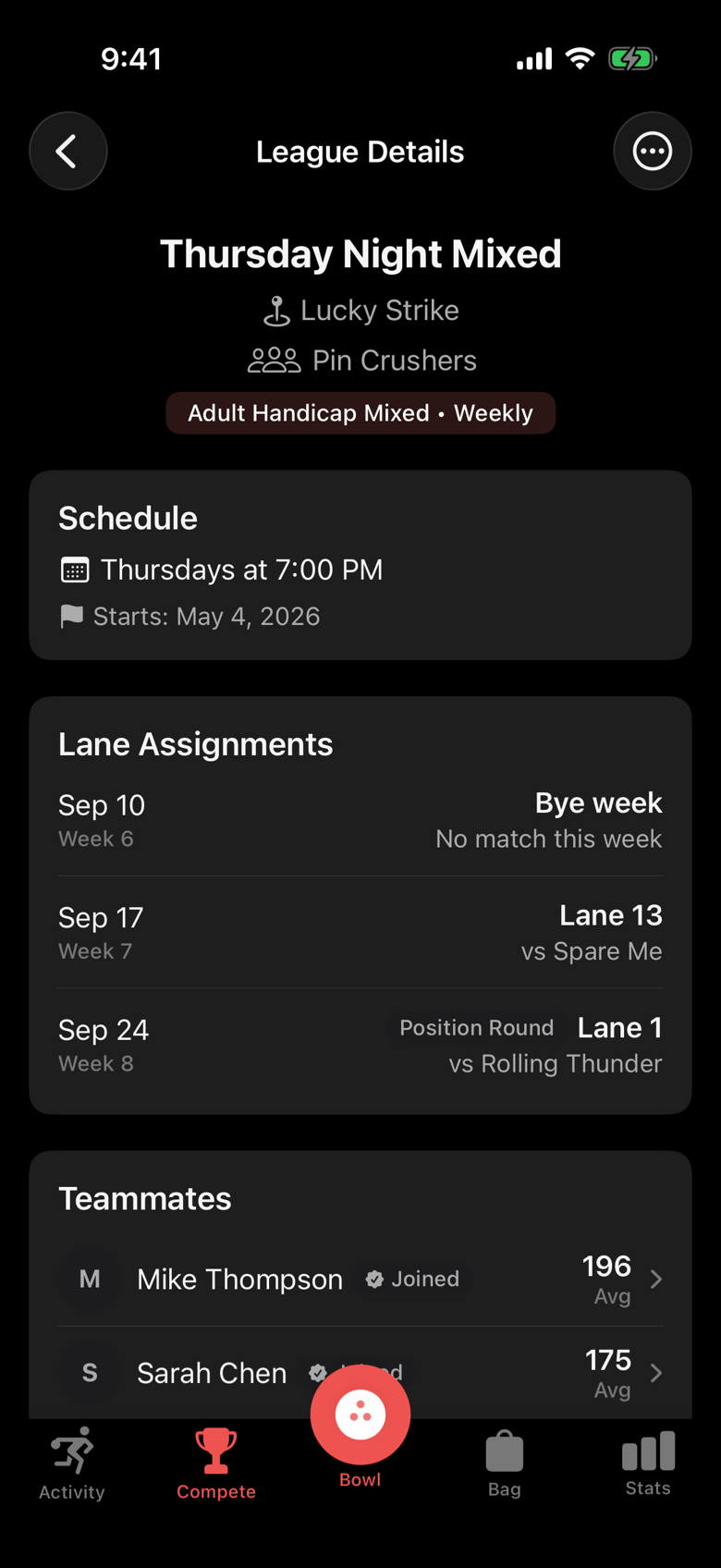
For leagues with public standings, the league page shows a Lane Assignments section: the next three weeks with the date, the week number, your lanes, your opponent, and pills for Position Round and Bye week. When the standings site publishes the schedule, this is where it lands, and when you start a league session the lane number is prefilled from it.
If the section reads "We couldn't match your team automatically", tap Find my team once and it stays matched for the season.
Teammates
The Teammates section lists the official roster with each bowler's season average, refreshed from the standing sheet. From here you can invite the team to the app (Invite All, or per row), mark a roster entry as you ("This is me") if the match got it wrong, and fix a misspelled name.
Teammates who join can follow each other and see each other's live scores on league night. Nothing is shared until each person chooses to.
League day
The app keeps a reminder for each league. Depending on how you set it, you get one of three things: a push notification ("It's league time!" with the league, your lane and your opponent, or "Bye week, no match tonight"), an in-app banner on the home screen ("Monday Mixed tonight · 6:30 PM · Lane 8 · Tap to record"), or a lock screen countdown in the last hour before start. One channel at a time, so you never get all three.
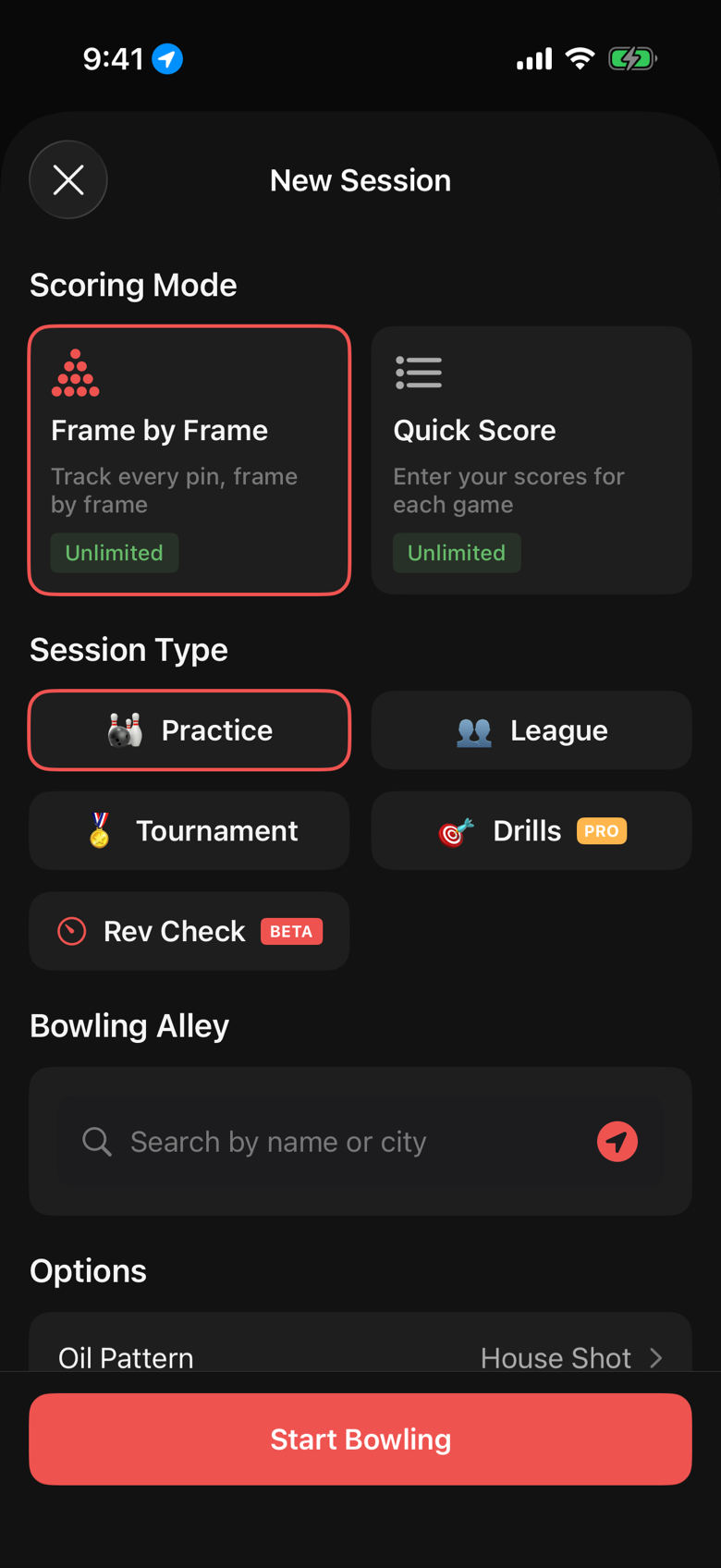
Tap any of them and the app opens New Session with the league, the lane and the format already set.
Watching the season
The league page carries the whole season: Statistics, Series Averages, Scoring Trends, Average by Lane Pair (some pairs are kinder than others), Score Distribution, and the History of every week.
Average by Lane Pair is the underrated one. If you average fifteen pins less on lanes 7 and 8, that is worth knowing before position round puts you there.
Weeks you forgot
Two safety nets.
A "League Scores Available" banner on the league page appears whenever the standing sheet has a week you did not record. Tap it, confirm your name, and the missing weeks import with the totals.
If you end a league session with fewer games than usual, the app asks "Forgot to record anything?" and lets you add the missing game's total on the spot.
Two leagues, a new season, the end of a season
Each league is separate in the app: its own average, handicap, goals, reminders and history. Bowl in two and the reminders know which night is which.
When the standings site rolls to a new season the app asks "Start a new season?" and, once you confirm your team again, keeps importing. Old seasons move under Completed Seasons on the Compete tab with a recap: final average, high game and series, best and worst weeks, and a link to the full season stats.
At the end of a season, tap End Season on the league page. You get the recap, and you can reopen the season later if you ended it early.
FAQ
What if my team is not matched?
Tap Find my team in the Lane Assignments section and pick your team from the list. If the standing sheet lists your team under a different name than you expect, look for your teammates' names.
My center does not post standings online. What do I lose?
Score import, lane assignments and the roster. You keep everything else: your own scores, averages, handicap, goals, reminders and the recap. Add the league manually and record each week.
Can I track a league where I am only a sub?
Yes. Add the league and record the nights you bowl. Your average in the app is your own; the league's official book handles the sub rules.
Does the app know my handicap?
It computes one from the average and the handicap base you set on the league, and shows it with your average. Check the base against your league rules once at the start of the season.
How do I see last season?
Compete tab, Completed Seasons. Each one opens a recap with a link to the full stats for that season.